FieldQuote · UK trades
Plumbing quoting software for UK plumbers
Create itemised quotes for repairs, installations and refits. Send one customer link for online acceptance, and take a deposit before ordering parts with Pro and Stripe.
What FieldQuote does
- Create a professional quote
- Send one link to your customer
- Customer accepts online
- Customer pays a deposit
- You start the job with confidence
Built for UK trades · No card to try · £29/mo for deposits & more
Quote link
ExampleMini preview
Boiler repair
Quote total
£285
Deposit due
£75
Static preview — not interactive.
Worked example
Plumbing quote example: replacing a kitchen tap
Illustrative figures, not a market-price guide or a customer quote. This example assumes no VAT is charged. Set your own prices, scope and any applicable VAT for the job you have assessed.
Kitchen mixer tap replacement
| Item | Qty | Amount |
|---|---|---|
| Mixer tap | 1 | £95 |
| Connectors and consumables | 1 set | £15 |
| Labour for the agreed replacement | 1 job | £90 |
| Quote total | £200 | |
- Example deposit
- £60
- Remaining balance
- £140
State what is included
Supply and fit one mixer tap at the existing sink, using the existing accessible connections. Include removal of the old tap, installation and a leak check.
Explain the limits before acceptance
The example excludes changes to pipework, a new sink and repairs to concealed damage. Confirm access and the condition of the existing fittings before fixing your price.
Give the customer a clear next step
Send the quote link for review and online acceptance. If you use Pro with Stripe connected, your customer can also pay the deposit you set. Agree when the remaining balance is due in your payment terms.
Adapt the plumbing quote template, or use our quote checklist to check the scope and terms before sending.
See what the customer receives
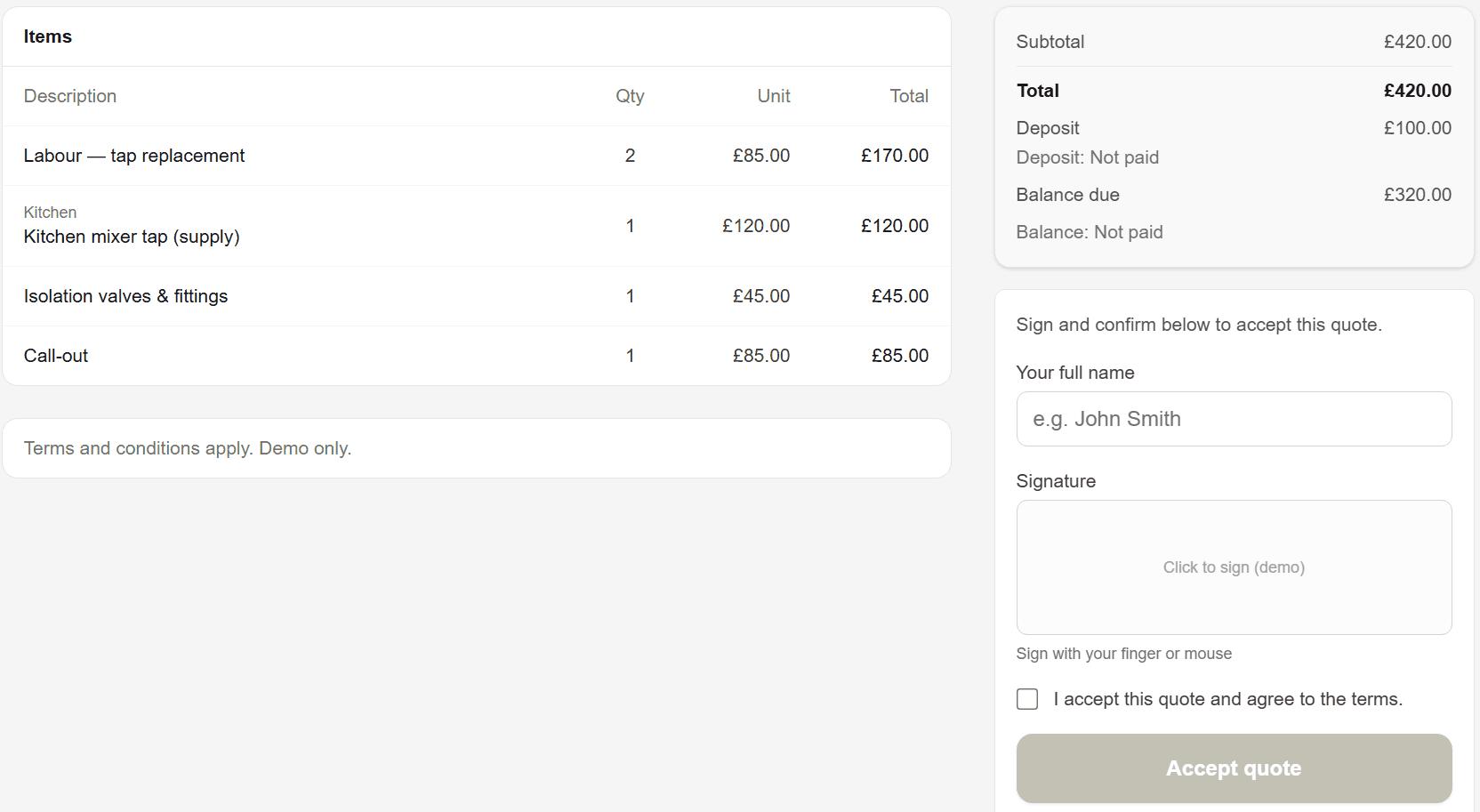
The customer link shows itemised work, the total, deposit and balance, with an acceptance form. This screenshot uses sample plumbing work; use your own descriptions, prices and terms.
What you get
Built to get the deposit before you start.
Separate labour, parts and the work you have agreed
Build a plumbing quote with quantities, materials and labour as separate line items. Describe the job clearly so the homeowner can see whether you are replacing a fitting, repairing a leak or quoting a larger refit. Use your own rates and allow for the conditions you found on site.
Send one quote link the customer can open on their phone
Your customer reviews the quote in their browser and accepts online. They do not need to install an app. Follow the quote's status in FieldQuote so you can decide when to follow up.
Set a deposit before ordering parts
On Pro, connect Stripe and set the deposit for the job. Your customer can pay through the quote link after accepting. Explain the deposit and remaining balance in the quote before asking the customer to commit.
Start with a plumbing template and adjust it to the visit
Use a template as a starting point, then edit quantities, materials and wording. A tap replacement, boiler repair and bathroom refit need different scope notes; avoid sending the same generic description for every job.
Keep changes to the job clear
Record what your price covers and what it excludes, such as hidden pipe damage, access work or making good. If the scope changes, agree the extra work and its price with the customer before proceeding.
How it works
Quote, accept, deposit — one link.
Create the quote
Line-item the work in FieldQuote.
Send one link
Text or email the customer link.
Customer signs
They accept on their phone.
Request a deposit
Pro and a connected Stripe account enable card deposits.
FAQ
Questions UK trades ask
Related on FieldQuote
Get the deposit before you start
No customer app. No PDF chasing. Quote, accept, deposit — one link.